The Setup Center
The Setup Center is a running checklist of everything that turns Passport on for your church — grouped into three acts, and ticked off automatically as you do the work.
What you need
- A Passport account with the Admin or Super Admin role
- A few minutes at a time. Nothing here has to be finished in one sitting
Open it from Admin → Setup Center, or go straight to /setup.
How it works
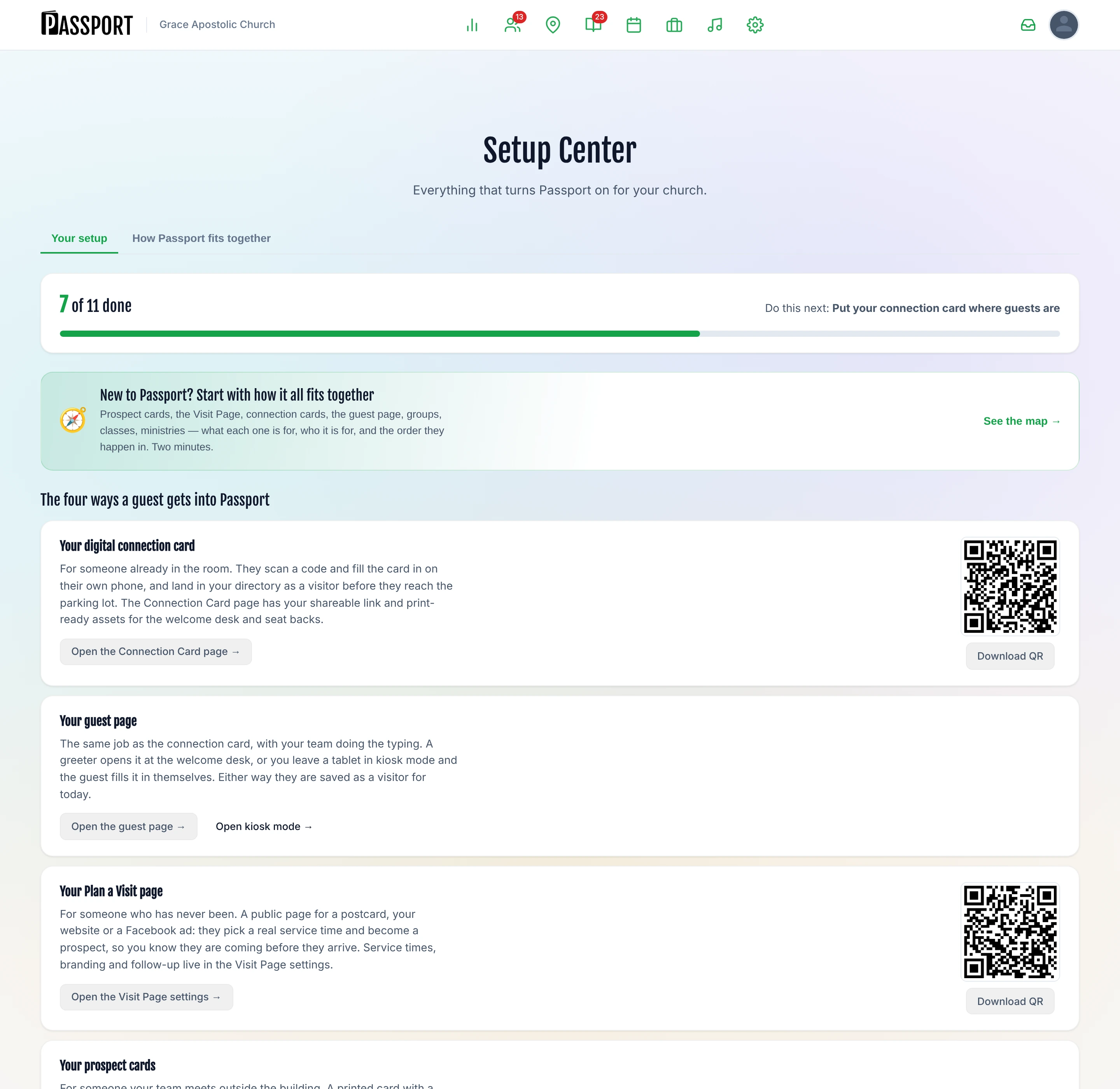
Most milestones complete themselves. Passport does not ask you to tick a box saying you imported your people — it looks at whether you have people. When you finish a task in the product, the Setup Center notices on your next visit.
Two things follow from that:
- You cannot fake progress, and you do not have to remember to record it. The checklist reflects your actual data.
- Editing what we gave you counts. Signing up seeds one service, five groups, a class and seven ministries so the member portal is not empty on day one. A milestone that says "make these yours" is watching for you to change them from the defaults — not just for them to exist.
One milestone is different: Put your connection card where guests are cannot be detected, because no query can tell whether a QR code is taped to the welcome desk. That one you tick yourself.
:::tip There is a live version of this The How Passport fits together tab of the Setup Center shows the same map as How Passport Fits Together, but with only the parts your church has, and every box is clickable. :::
Get the basics right
The three things everything else stands on.
| Milestone | Why it matters | About |
|---|---|---|
| Finish your church profile | Your address and phone number appear on every guest-facing page and card. Blank fields make a visitor wonder whether the church is still meeting. | Church Profile |
| Bring your people in | Almost nothing works on an empty directory — no groups, no attendance, no follow-up. Importing first also stops you hand-building groups your old system will duplicate. | Importing & Exporting Data |
| Confirm your service times | We guessed Sunday at 10:30. Guests pick a real service when they plan a visit, and attendance is recorded against it, so a wrong time is wrong everywhere at once. | Admin → Settings → Services |
Ready for Sunday
Enough set up that a first-time guest on Sunday is captured rather than lost.
| Milestone | Why it matters | About |
|---|---|---|
| Put your connection card where guests are | A paper card in someone's pocket on Sunday is a stack on a desk by Tuesday. Print the QR for the welcome desk and seat backs, and guests fill it in on their own phone. | Visitor Connection Card |
| Capture your first guest | Everything downstream — follow-up tasks, journeys, the guest pipeline — starts from one real person. Adding someone yourself is the fastest way to see what your team will see. | Staff Guest Intake |
| Make sure follow-up actually sends | Everything else on this page assumes a guest hears from you. With texting off, or your journeys paused, a guest fills in your card, lands in your list, and never hears a word. | Guest Journeys |
| Make the starter groups yours | The five seeded groups tell members you have not set the place up. Rename them, delete what you do not run, add what you do. | Groups |
| Make your Visit Page yours | Your page is already live, which means guests can already find it. Add a headline, a photo, what to expect, and a welcome from your pastor. | Plan Your Visit Page |
| Say which teams you actually run | We gave you seven starter ministries, two of them working with children. Volunteers sign up against this list and the background-check gate reads it, so a team you do not run collects volunteers nobody will schedule. | Ministries |
| Say what your teams actually need | We gave you seven ministries with nobody in them and no positions. Until a ministry says it needs three greeters and two in the kids room, nothing can tell you Sunday is short — an empty schedule just looks correct. | Positions & Teams |
| Schedule one Sunday and ask them | A schedule nobody has been asked about is a list of guesses. Once the requests go out, people answer on their phone without making an account, and you find out on Tuesday who is missing instead of at 8:55 on Sunday. | Scheduling Your Team |
| Plan one service end to end | Right now your team finds out what is happening on Sunday when it happens. One published plan puts the order, the songs and the call times on every volunteer's phone. | Planning a Service |
Grow from here
The things that turn a working Sunday into a church that can follow up, measure and grow.
| Milestone | Why it matters | About |
|---|---|---|
| Invite your team | Care assignments have to land on a real person. Until a second person logs in, every follow-up task in the building is yours. | Users & Roles |
| Decide how people become members | Passport promotes a guest to attendee, and an attendee to member, using rules you set. On the defaults everyone advances on attendance alone, so "member" ends up meaning "came a few times" in every report you run. | Visitor to Member Path |
| Get your own texting number | You are sending from Passport's shared number, which works. Your own number means replies land in your inbox and only yours, and guests see the same number from you every time. | Admin → Settings → Text messaging |
| Take attendance once | Attendance is what turns "they said they were coming" into "they came". Without it Passport cannot tell you your show rate, or notice when a regular stops showing up. | Attendance Tracking |
| Turn on online giving | Members who give online give more consistently than members who remember an envelope. Connecting Stripe also puts giving history on the same person record as everything else. | Online giving |
:::note Some rows need a bigger plan A milestone that needs a Plus or Pro plan shows as locked with a link to upgrade rather than disappearing, so you can see what you are not using yet. Check your plan under Admin → Settings → Plan & Billing. :::
Common questions
| Question | Answer |
|---|---|
| I finished something but it is not ticked | Progress is recalculated when you open the Setup Center. Reload the page. |
| A milestone disappeared | Milestones are hidden when the feature is not part of your plan. Check Plan & Billing. |
| Can I skip the whole thing? | Yes. Nothing here blocks you from using Passport — it is a checklist, not a gate. |
| Do I have to do them in order? | No, but the order is the one that causes the least rework. Importing people before building groups is the big one. |
Next steps
- Starting from scratch — the onboarding wizard walks the same ground in one sitting.
- See the whole picture — How Passport Fits Together explains why the milestones are in this order.
- Get your first guest in — once the basics are done, set up your Plan Your Visit page.